
UPDATE: May-27-2013: Since Google decided to shutdown google reader from 1st July, This article has become obsolete. Please click me to read the new technique/trick on how to use feedly instead of Google reader.
How to read Hindu Online, Efficiently? Ans. Well, one way is their E-paper edition (http://epaper.thehindu.com/ ).
Problem:
- costs money
- doesn’t work well on low speed internets.
- Not convenient on small sized monitors.
But here is a workaround, using Google Reader, that doesn’t cost money and gives you data in a more organized way.
Step1: download this file named “google-reader-subscriptions.xml” CLICK ME
Step2: Goto this link: http://www.google.com/reader
Enter your gmail username-password. If you don’t have a gmail account, you can create one for free.
You’ll see a new window, Click on that bolt-like icon and select “Reader settings”.
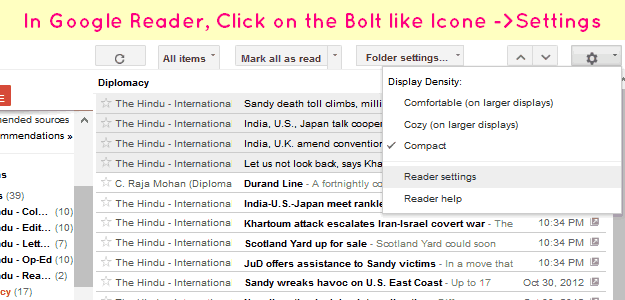
You get a new window.
Step:3 Select the “Import/Export Tab”
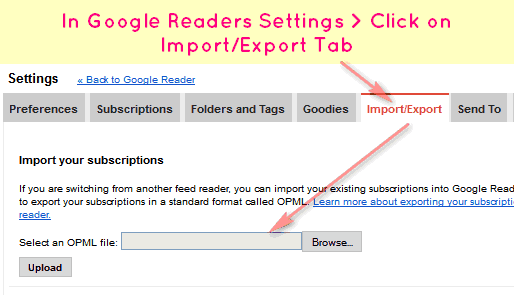
- Now upload the file you downloaded in step1 (google-reader-subscriptions.xml)
- You’ll have subscription to all the important items. Click on “Back to Google Reader“.
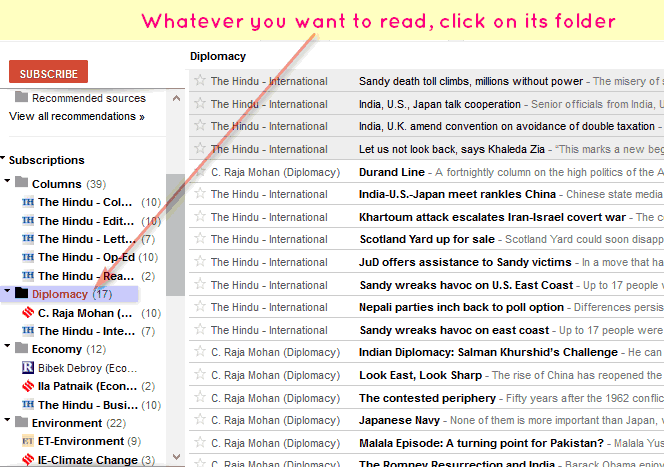
- You’ll be back to home page of Google reader. Now click on individual folder to see the news items. Check the following screenshot
- This online trick requires way too many mouseclicks and stress on eyes, so Use it as a last resort, otherwise it is far more convenient to read and make notes out of paper-edition in real life, more on that, explained at bottom.
- At first this would feel like an information overload, but not every news item is important. (we already discussed that- in the How to read newspapers click ME) so learn to skip the news items.
- And even in the important news items, don’t get bogged down by dates, names and numbers. You job is to find out the essential facts/features/pros/cons or fodder material (in case of columns)
- If some news article / column is extremely important, you can click on the “star” button on the left side, to bookmark it for future reference.
Here is an overview of the what you’ll have in your google reader, after uploading my settings file.
| Folder | Content |
| Column | All columns, editorials etc of Hindu. But unlike IndianExpress, they don’t have system of classifying editorials according to name/themes so at times you may also find columns related to music and movie reviews -Skip them. |
| Diplomacy/IR |
|
| Economy | Hindu’s articles. It has four subsections: Market, Industry, Economy, Companies.
|
| Environment | Hindu Sci-Tech (sub-segment) Energy and Environment + Indian Express’s section on climate change +Economic Times’s section on Development issues involved in environment.Why this overkill for environment. Well, UPSC is giving too much emphasis on those questions related to environment and biodiversity, both @prelims and mains level. Again, not every thing is important for e.g. if XYZ NGO has done some small solar project there will be a news item. But no need to read it |
| Misc. | It contains updates from a blog called sarkari-naukari, to inform you on upcoming vacancies in State PSC, ONGC, LIC, other PSUs, SSC and Bank jobs. But If your career backup plan doesn’t involve those fields, then remove this subscription. |
| Polity and Yearbook |
|
| Public Health | Hindu segments on health, medicine, policy Issues. |
| Science-Tech | Both Hindu + indianexpress segments. Not an overkill, because Sci-tech is important for both prelims and mains plus many a times news items here overlap with Environment and Public Health. |
| Supplements | Mrunal.org, Hindu’s English- vocabulary, culture segment. |
In case you are wondering where is the “Front page”!?
Well, The Hindu’s RSS feed-system is such that frontpage items overlap with national, Economy and International segment. So, you’ll find them in appropriate folders.
How to add more subscriptions?
In this google-reader subscription, I’ve skipped certain segments of The Hindu. For example “Gadgets” segment because it usually contains only mobile phone reviews and such items are useless from exam point of view. So I skipped it. Same goes for “Career and Jobs”. Anyways, visit this link
http://www.thehindu.com/navigation/?type=rss
You’ll find subscription link to various segments. If you need to add more, just right click on particular link select “copy link address”, come back to google reader page, click on that orange colored “Subscribe” icon and paste the link and click on “Add” button.
E.g. if you’re from Banglore or Hyderabad, you might want to add those feeds in google reader. (for profile-based interview questions)
Side question: I’m from UP, Maharashtra, Gujarat or Punjab, what should I do? Because Hindu doesn’t have special feeds / segments for those states.
No problem, goto this link and add the required feeds
http://www.indianexpress.com/rss/
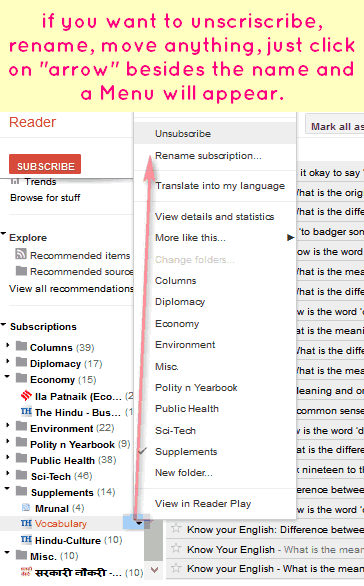
You can subscribe to any other website, as long as it is providing the RSS feeds. To remove or rename any subscription, just do as directed in this screenshot.
Anyways, Use the online edition of The Hindu, only as a last resort because it is far more convenient to read and prepare notes out The Hindu’s paper-edition, compared to the online edition. (Tips on speed reading of paper-edition, were given in separate article, CLICK ME)
Following situations can happen
- The newspaper vendor says he’ll charge extra Commission and or deliver The Hindu after lag of one day. Well go ahead and use it.
- The newspaper vendor simply refuses to deliver The Hindu. In that case, visit local Government library, see if they’ve it.
- If you’re a full time UPSC aspirant, then visit library everyday use The Hindu. If you’re a working professional, it may not be convenient to make trips to library each day so visit it on weekends and cover all Hindus of that week.
- Hindu is nowhere available in your town. You don’t have good speed internet or there is electricity problem. In that case subscribe to paper edition of Indianexpress, make notes out of it and use the following google reader trick, to access Hindu once in a while and update whatever was not covered in Indianexpress.
- If you’re a Hindi (or any non English) aspirant, still you need to read English newspaper (Hindu/IndianExpress) for current affairs because Dainik Bhaskar, Gujarat Samachar etc. can’t provide you the content, depth and coverage required for UPSC level questions.
And Mind it: Times of India doesnot count as newspaper for UPSC or any other competitive exam. It mostly deals with Masala News, Mainstream/ Breaking news type of thing. Ya it may cover a few news topics in good manner but your time, energy (and money) is way better served in following Hindu or Indianexpress, in terms cost:benefit.
So, In the end, use whatever way you feel comfortable, device your own solutions but daily newspaper reading (+notes making)=essential for success in UPSC exam.
![[Tech] Using Microsoft Onenote to organize your study-notes: Image to text, Audio notes and more](https://mrunal.org/wp-content/uploads/2012/12/i-onenote-500x383.png)
mrunal sir you rocks ….thanks for this post it will certainly help people like me dont have access to The Hindu.Thanks again.
thx Mrunal….i was really in need of this…….thx sooo much……
Thanks………Its very useful.
Thank you….it makes things more systematic and organised.
sir its like you have taken an oath to push us through UPSC … the materials u are providing us is just great…. i think who ever is followin u shld atleast cler prelims
Thank u mrunal
It is very help ful
Could you please tel why cable tv digitization is made compulsory In 4 metros
mrunal ji … what is the difference between hindu e newspaper & the daily hindu daily newspaper which v can read on net without subscription??
e-paper is something like scanned copy of paper newspaper.
click on this link, you’ll get the idea on how e-papers look like
http://epaper.timesofindia.com
Hello I frequently use ur website n m quite very happy to say u thAT i like all ur posts and superb links …!! thank you very much sir..Ur web is a special boon for me n yes i really visit ur website every day..B’coz of u i hv started my studies vivaciously….!!!
Bravo Mrunal !!!, Clean Shot for working aspirants !!!
Thanks a ton, Mrunal… your are like a light house for many of us !!! :)
The Legend Of Mrunal !!
Thanks sir, u r great….this is very useful for me…b’coz the hindu is no available in my city……thanks a lot…
Did u create that xml file , how did u do that ?
Google reader settings > Import/Export > OPML >download
I read everything from hindu website.How different is the paper edition.
sir since 1 yr m reading times of india nd keeping important news paper cuttings….bt in d above mentioned article u told dat times of india is not good 4 competitive exm purpose..sir it is not possible 4 me 2 visit library daily or weekly….i wnt 2 subscribe 4 newspaper so dat i can get its copy daily nd keep imp news cutting…plz help
also suggest d name of newspaper nd any good current affairs monthly or yearly magzine 4 upsc exm..
thanks mrunal this will really help.
Dear Mrunal sir,
Regarding you current article I do not agree with the following:
1. Online edition should be the last resort.
2. The Times of India is not relevant.
I agree that online- epaper edition of The Hindu is not good enough and is neither user friendly. But the website of The Hindu i.e http://www.thehindu.com/ is extremely user friendly and convenient to read and to prepare notes( also free)
In the link just go to “Today paper” –>Index and from the Top follow the links:
a)Front Page
b)National
c)New Delhi
d)Opinion
e)Business
f)S&T (on Thursdays)
Read the articles online, and if one is comfortable to study notes on Laptop, then print the article to pdf file using software like “Primo Pdf” (http://www.primopdf.com/).
Then highlight the important text and save the pdfs in your computer.
It is less time consuming and handy to search and store, then articles from paper edition, which become bulky and demotivates one by its sheer size if notes were not made out of them separately.
Also this is a much ‘greener’ way to prepare notes.
2) Regarding TOI –> many articles and sometimes editorials and news in TOI are very relevant and if one is comfortable with reading online then its e-paper is very user friendly( also free). So a browsing the editorials of TOI online is not a waste of time.
Forgot to mention the International section of The Hindu
International affairs related news-articles of The Hindu will appear under the “diplomacy” folder.
Thank you very much sir….it is really helpful…thanks again!!! :)
thnxs sir mrunal for this post …..it will really help
thank you sir.
hello sir.
I have uploaded the subscription file and done everything as u said but i am not able to open the any folder(diplomacy, environment) only rename and change folder option is working.
Please help
sign out and login again on http://www.google.com/reader
awsme app thanks a lot bro ….!!!!
With Google Reader the issue is that, most of the times GR doesn’t fetch the entire content of an article. Same is the situation with The Hindu subscription. So eventually, One has to go to original webpage in-order to read complete article.
Thanx a lot mrunal.
Thank you very very much for that. Thanks a lot Sir.
Thank you…
What an Idea Sirji !!!!!!!!!1
What an Idea Sirji !!!!!!!!!
GREAT WORK THANX A LOT