
Imagine that you’re reading a newspaper or book. All you’ve to do is just keep highlighting important lines and phrases, and someone automatically copies them and prepares a separate note for you, in other words an Auto Notemaker!
Convenient, time saver, miraculous. And yes, it is possible- as long as you’re reading anything on computer- webpages or PDF files (on Microsoft Windows XP, Win8).
- Introduction
- Situation A: want to make notes out of PDF files
- Situation B: Auto Notes making from Website
- Converting Notes into Mindmaps
- Troubleshooting the Scripts
- Eye Strain
Introduction
Consider this example, I’m copy pasting an article from The Hindu
………The Indian Railways successfully tested a path-breaking technology called Train Collision Avoidance System (TCAS), about 150 km from Hyderabad, on Tuesday.
The TCAS technology, based on a combination of GPS and Radio Frequency enabled technology, applies brakes without the intervention of the loco (train) pilots once it detects another locomotive on the move or stationary on the same track and avoids collision. The technology includes installation of some electronic gadgets on the trains, in the stations and along the tracks.
……….Sources stated that the TCAS would not only help avoid collisions due to human errors in signalling and invisibility of signals due to heavy rain or fog, but alerts about fire on trains and warns about damage to the tracks during natural calamities or sabotage.
End of Copy Paste.
Now, from exam point of view, the topic is important but this article is very verbose and lengthy = not good for revision. But we can easily summarize the crux of the whole article by highlighting certain phrases, which are as following:
- Train Collision Avoidance System (TCAS)
- combination of GPS and Radio Frequency.
- applies brakes without pilots
- avoid collisions due to human errors, rain or fog, natural calamities or sabotage.
So how would you create such neat and crispy revision notes from newspapers / PDF files?
You’ve three options:
- Read the article, Manually type those phrases in notepad or MS word file =extremely tiresome and time consuming.
- Highlight every phrase, press “ctrl+C” (copy) then goto MS word or notepad Window and Paste “ctrl+v” (paste). Repeat this activity like 500 times for one stupid article = again waste time.
- Save the whole webpages for later reading and making notes in pen-paper format. = still inconvenient.
To solve this problem, I’ve created an automated computer script. It’ll automatically copy the selected phrases/keywords from a webpage or PDF file and store it in the notepad document.
Basically the principle is Option B cited above, but You don’t have to press ctrl+C/ctrl+V or switch between windows. That work is done in background via my computer script.
Instructions
Download and Install following softwares (free)
- Autohotkey (Lexicos Build) (Free) Link: Click ME (new webpage opens up, there is download button in it)
- Foxit PDF reader (Free): Click ME
- Save following Script Files anywhere on your desktop, harddisk or any folder.
Situation A: want to make notes out of PDF files
- fox XP Double click on “Mrunal’s Auto Notemaker for PDF”. For Win7/8, right click on its icon “Run as Administrator”.
- Now You will see the green icon in the taskbar, near the clock.
- Open any pdf file in Foxit PDF reader. For the Demonstration, I’ve opened India Yearbook 2011.
- If you’re using Foxit PDF reader’s “Classical toolbar” mode, then goto “Tools Menu”>>Text Selection Tool.
- If you’re using Tabbed Toolbar mode in Foxit PDF reader then >>Basic Tab >>Text Selection Tool. (otherwise text will not be selected)
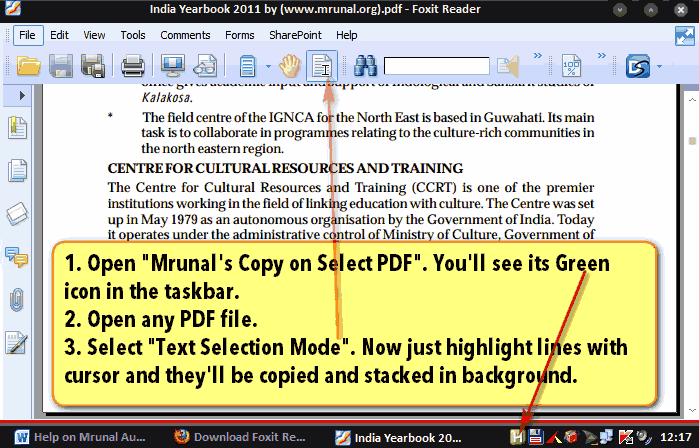
- Now read the Pdf file as per your convenience, and whenever you feel that some keyword or phrase is important, then just highlight it using your mouse cursor. (But make sure that you’ve selected “Text Selection Tool”)
- You’ll see that my script is copying those highlighted lines and you’ll receive ballon-tray notifications.

- Continue the activity until you’ve finish the topic/chapter in the given pdf file.
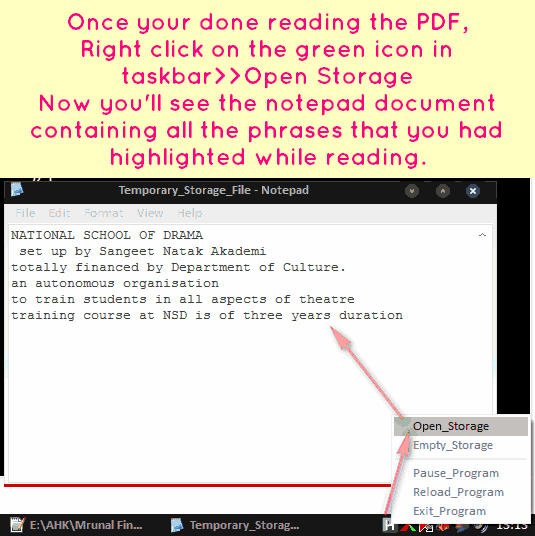
- Once you’re done reading the topic/pdf file, then right click on the green icon in taskbar -> “Pause Program”
- Now again Right Click on green icon > “Open Storage” and you’ll see the notepad file containing all the phrases that you had highlighted during reading.
-
Click to Enlarge
- Copy paste the content of this notepad file into another MS Word document / Notepad / Evernote / Onenote or any other software, as per your requirement.
- Close this notepad file.
- Right click on the green icon >> Empty Storage. (plz note, it’ll remove the content from that notepad file).
- If you want to continue making notes, then continue highlighting lines in Foxit. And repeat above steps for number 4 onwards.
- If you’re done, then exit the program by right click>>Exit program
Situation B: Auto Notes making from Website
- Launch google chrome.
- Double click on “Mrunal’s Auto Notemaker for Web”. Now You will see the green icon in the taskbar, near the clock.
- Just select the phrases/highlight phrases while reading any article or website and they’ll automatically get copied in background.
- Once finished, Right click on green icon > “Pause Program”
- Now again Right Click on green icon > “Open Storage” and your data will be there. Copy paste it in separate word file, evernote, freemind or any other software as per your requirements.
- Other instructions are more or less the same like Situation “A” for PDF files.
- You may also use this script for copying from MS Word, Notepad etc fileformats.
Converting Notes into Mindmaps
Suppose after copying from here and there, you’ve gathered following lines
- Train Collision Avoidance System (TCAS)
- combination of GPS and Radio Frequency enabled technology
- applies brakes without the intervention of the loco (train) pilots
- avoid collisions due to human errors,heavy rain or fog, natural calamities or sabotage.
- NATIONAL SCHOOL OF DRAMA
- set up by Sangeet Natak Akademi
- totally financed by Department of Culture.
- an autonomous organisation
- to train students in all aspects of theatre
- training course at NSD is of three years duration
The first four lines are from The Hindu newspaper (web) and remaining lines are from India Yearbook 2011 (PDF). I’ve made this list using my scripts. (I did not manually type above list)
- Now I want to properly arrange this data into a mindmap for quick revisions.
- So, Copy that list. (please copy such lists from a notepad text file or MS word file, because if you directly copy paste it from a webpage, then the list may not display properly in the mindmapping program.)
- Anyways, after copying the list, Open either Freemind or Mindjet Mindmanager.
- Create a new Mindmap.
- Now select Central Note (the gray circle titled “New Mind Map”) and press Ctrl+V (Paste)
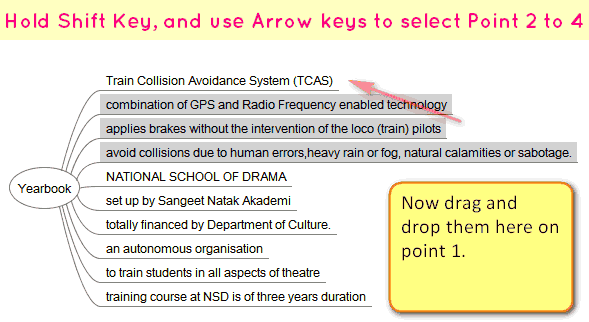
- You’ll get this result.
Click to Enlarge
Now hold down Shift key, and using arrow key, select the point number 2 to 4 and drag them into point number 1. And you’ll get this result:
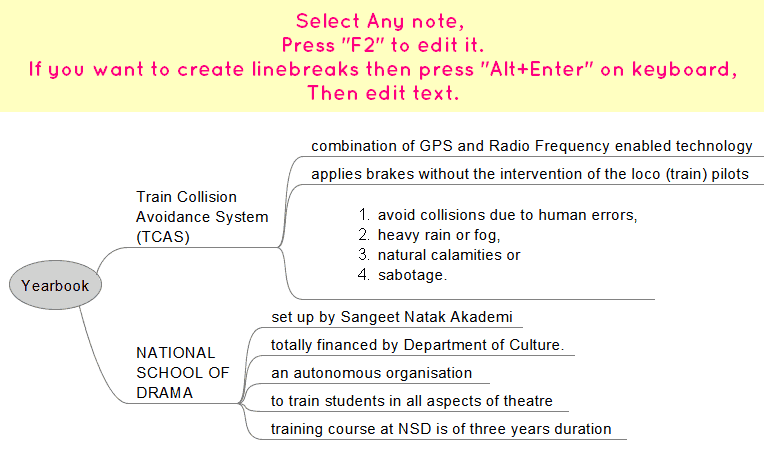
Click to Enlarge
Lastly, I’ve added some fancy formatting to beautify the mindmap and here is the final result.

Click to Enlarge
Troubleshooting the Scripts
- I’ve tested this on XP SP3, working without problem.
- Tested on Win8 (64-bit). As long as you launch the program via right click “run as administrator”, should work fine.
- This does not work with just ‘any’ version of Autohotkey software. This works only with a customized version of Autohotkey software, known as “Lexicos’ build. (Autohotkey_L)” So if you’re having any issues, uninstall your autohotkey, then download and install following file: http://l.autohotkey.net/AutoHotkey_L_Install.exe
- If you got the error window that “—> 023: Run,%A_scriptdir%\Temporary_Storage_File.txt...huge piece of code” This happens when you launch the script for the very first time and directly click on green icon >> open storage. This error happens because system has not yet created that “Temporary_Storage_File”. So solution is simple: relaunch the script, Selected a few lines in PDF/Webpage only for testing and then Green icon > right click > Open Storage.
- Sometimes it doesn’t detect the lines selected by cursor. So either restart the program or try again. If you drag your cursor too fast or too slow, then the script may not detect and copy the text. In the Web script be extremely cautious while moving your mouse in dragging and highlighting lines, else it might copy the whole web instead of a single phrase :)
- Will not work if the PDF file is “copy-protected” or if it is just a scanned image of a document without OCR. Same goes for Non-English PDF files
- Mrunal’s Auto Notemaker for Web, tested on firefox, internet explorer and Chrome. (Although Chrome would most reliable). If problem then disable other Plugin/addons.
- Better “Empty Storage” after work is done. i.e. right click on green icon >>Empty Storage.
- Better close/exit the script when not in use. Otherwise script might unnecessarily keep copying the text while you’re surfing websites for non-study purpose.
- May or may not function properly if you’re using Vista or Win7 or Windowsblinds themes (because of the “ Balloon Traytip” feature)
- Donot launch both scripts simultaneously. Use only one script at a time.
- Donot use this in combination with Clipmate or Clipcache or similar clipboard modifier programs.
How to Report Bugs/Errors
If you run into any trouble, don’t hesitate the post the comment below.
But For faster diagnosis of problem, please describe it in following format.
- Name of your Operating System: Win XP, Vista, Win7, Win8
- Are you using Autohotkey “Lexicos Build”?: Yes/No.
- Script : PDF or Web?
- Name of the web browser (if problem in Web script): Internet Explorer, Google Chrome, Firefox
- Description of the problem and what solutions have you tried:
Eye Strain
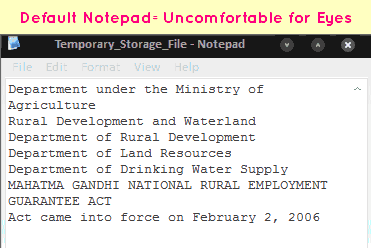
- My script copies the data in a .txt file (notepad file)
- But the default notepad has white background and black text = very uncomfortable for eye, if you consciously work for more than 10 minutes.
- Therefore I suggest you use Notepad++ (free download: CLICK ME)
- Open notepad++, click on Settings >> Styler Configuration >>Change theme according to your liking.
- To make Notepad++ as your default alternative to Notepad, you need to goto Notepad++ >> Settings Menu >>Preferences >>File Associations >>.txt
- Compare the screens:

Foxit PDF reader: Changing Background Color
- When you’ve to read lengthy PDF files, with white background + black text = very uncomfortable.
- To solve this problem, Goto Edit>Prerences (or press Ctrl+K on your keyboard)
- Now select “Accessibility” and replace the document colors (for example black background and yellow text).
![[Tech] Using Microsoft Onenote to organize your study-notes: Image to text, Audio notes and more](https://mrunal.org/wp-content/uploads/2012/12/i-onenote-500x383.png)
The same thing keeps on getting copied again and again even when newer things are being selected on web.
Please help resolve this.
Yes, Even I observed the same problem
It was really really awesome..!!!
Hi Mrunal, you are doing an awesome job. Just a suggestion. why don’t you outsource the coding for AutoNotemaker in some open source forums. I am sure someone will be able to come up with a solution for this to work in Windows 7.
Keep up the gud work man.
How to disable the “links” from getting copied
Name of your Operating System: Win8
Are you using Autohotkey “Lexicos Build”?: Yes
Script : PDF or Web? : BOTH
Name of the web browser (if problem in Web script): Internet Explorer, Google Chrome, Firefox
Description of the problem : After highlighting the text, highlighted text will get copied to the notepad only once and next highlighted text will not be copied to the notepad.
What I tired? : while highlighting I will press the Ctrl+C so that the highlighted text is copied.( may be issue is with clipboard access )
Hi I am using UBUNTU
Want help for that .
A) I have been working with the above mentioned software in your article for the past few months. Those were working fine.
Recently, after formatting my computer, I have again downloaded those software. Somehow the Foxit reader couldn’t be downloaded properly, although the other links worked fine. Then I download it directly from net and now its working well. It seems that there may be some problem in the Foxit reader link.Dear Mrunal, I request you to kindly check it once.
B) Tried the MIND MAP for the first time. I clicked on the ‘Freemind’ link.A desktop icon ‘MiPony’ has been launched.I clicked on it but couldn’t ‘Create a new Mindmap’ as depicted by you in your article. Please help.
awesome !!
freaking awesome !!!
Hi Mrunal,
Thanks for all the information you post on this website. It has been great help to me!
I found a browser extension ‘Remarkerbe’ which has some nice note taking capabilities. It is simple, but powerful. I tried it and loved it. I thought more people could benefit from it if this suits them, so I am sharing the link here : http://remarker.be/getting_started
It has something called ‘Keypoint tools’. ‘topic tools’ etc which will allow you to mark a certain phrase you selected as a question/answer/topic/good so on. We can at the end save all the phrases with these marks with a single click. If anyones using Evernote, it has the capability of sending your notes to Evernote as well.
Thanks,
Pam
Hi Pam
It helped. Thanks for sharing the information
sir i am using windows8.I am finding difficulties in downloading the programmes only. what to do sir? please help me.
hello ashok , i am using window 8 single langauge actived version. and i am follow all the instruction on the article . so follow all instruction
thanks a lot sir…
I have been exploring for a little for any high quality articles or weblog posts in this sort of area . Exploring in Yahoo I finally stumbled upon this site. Reading this info So i’m satisfied to convey that I’ve a very good uncanny feeling I discovered exactly what I needed. I such a lot indisputably will make sure to do not put out of your mind this web site and provides it a look on a continuing basis.
can i use this for other language like gujrati or hindi..???
i try but is shows only squar font…
yes it doesn’t grab Non-English text, particularly in PDF files.
Simply….
you are great I am looking for this kind of technique from my graduation
Thank You…
Both the links are dead, please reupload thanks…
Mrunal’s Auto Notemaker for PDF
Mrunal’s Auto Notemaker for Web
It just copies the old text again and again though at times it does copy normally. Sometimes even if done slowly it does not copy the whole sentence highlighted. Kindly help. This can be a great tool. I would be ready to even pay for this if this works fine.
Hi Mrunal Cant this be used for tablets and I pads also?
no it won’t work on tablets and ipads.
i tried to install free mind from ur link but its saying tat installation file is corrupt & intltn can’t be completed it taken 64 MB of data also!!!
how will i prepare notes no!!!!
please help me regarding this problem
hi mrunal
while using this free note for web while i am highlightng the para and doing pause and open it shows nothing runing win 8 pl help.
Hi Guys, there is a really very cool alternative to “autonotemaker” called “cintanotes” which works seamlessly on windows 7.
The same program(and hotkey) works for websites and pdfs(or anywhere else).
Here is the link:-
“http://cintanotes.com/files/CintaNotes_2_1_1_Setup.exe”
After installing it don’t forget to customize it according to your needs.
Really awesome informations…extremely useful for IAS Aspirants……..Thank you Sir…Keep doing
Hi Mrunal
I found the solution for autonotemaker pdf for Windows 7 and 8
install the files required foxit and autohotkey
right click on shortcut links of foxit and auto hotkey under compatibility tab select windows xp sp 3
this will help the program run in windows xp mode
so it wud work fine without any problems :)
PS: Mrunal ( Messenger of God for competitive exams )
Hi mrunal your autonotemaker for pdf scripts is just fantastic…
but as its work only for foxitpdf reader and i am as a professional cant install foxit pdf reader in office…
so for job professional like me and other students who cant install foxitpdf i have done slight change in your scripts and have made a script which support the same functionality with adobe reader
Hope it will be benificially and its supports all operating systems including windows8.
the script is below just copy the script and save in notepad as .ahk file extention and than your ahk file generate double click the file and you are ready to use the script
/*Created by Mrunal.org for only Foxit Pdf
But Slighty modified by Varun Pal inorder to
Use it for Adobe Reader pdf too.
This program is free software: you can redistribute it and/or modify
it under the terms of the GNU General Public License as published by
the Free Software Foundation, either version 3 of the License, or
(at your option) any later version.
This program is distributed in the hope that it will be useful,
but WITHOUT ANY WARRANTY; without even the implied warranty of
MERCHANTABILITY or FITNESS FOR A PARTICULAR PURPOSE. See the
GNU General Public License for more details. .
*/
#Persistent ; Keep the script running until the user exits it.
#SingleInstance,force ;prevent multiple scripts from running.
Menu, tray, NoStandard
Menu, tray, add,Open_Storage
Menu, tray, add,Empty_Storage
Menu, tray, add, ;seperator
Menu, tray, add, Pause_Program
Menu, tray, add, Reload_Program
Menu, tray, add, Exit_Program
return
Open_Storage:
run,%A_scriptdir%\Temporary_Storage_File.txt
return
Empty_Storage:
FileDelete,%A_scriptdir%\Temporary_Storage_File.txt
FileAppend,,%A_scriptdir%\Temporary_Storage_File.txt,UTF-8
TrayTip,Clean!,Temporary storage =empty.,
return
Pause_Program:
Suspend
return
Reload_Program:
Reload
return
Exit_Program:
ExitApp
return
#IfWinActive ahk_class AcrobatSDIWindow ;Prevents scripts from working if Foxit PDF reader is not running
DClickT := DllCall(“GetDoubleClickTime”)
~LButton::
if (A_TickCount-DClickT < LastClickTick ) {
Sleep 50
Send ^c
}
LastClickTick := A_TickCount
MouseGetPos X0, Y0
KeyWait LButton
MouseGetPos X, Y
If (Abs(X-X0)+Abs(Y-Y0) < 5)
Return
Sleep 10
Send ^c
Gosub,textcleaner
return
textcleaner:
Clipboard:=RegExReplace(Clipboard,"\R++(?<!\n\n|\r\n\r\n)"," ") ;essential for PDF files due to line-break problems
FileAppend, %Clipboard%`n,%A_scriptdir%\Temporary_Storage_File.txt,UTF-8
TrayTip,Copied!,%Clipboard%,
return
Note – For above creation of .ahk type of files you have to firstly install Autohotkey (Lexicos Build) software in your pc
and for more learning and installing process of Autohotkey you can also visit to the site
http://www.autohotkey.net
A single script for both Adobe reader and Foxitreader
just copy the script and save in notepad as .ahk file extention and than your ahk file generate double click the file and you are ready to use the script
/*Created by Mrunal.org for only Foxit Pdf
But Slighty modified by Varun Pal inorder to
Use it for Adobe Reader pdf too.
This program is free software: you can redistribute it and/or modify
it under the terms of the GNU General Public License as published by
the Free Software Foundation, either version 3 of the License, or
(at your option) any later version.
This program is distributed in the hope that it will be useful,
but WITHOUT ANY WARRANTY; without even the implied warranty of
MERCHANTABILITY or FITNESS FOR A PARTICULAR PURPOSE. See the
GNU General Public License for more details. .
*/
#NoEnv ; Recommended for performance and compatibility with future AutoHotkey releases.
SendMode Input ; Recommended for new scripts due to its superior speed and reliability.
SetWorkingDir %A_ScriptDir% ; Ensures a consistent starting directory.
#Persistent ; Keep the script running until the user exits it.
#NoEnv ; Recommended for performance and compatibility with future AutoHotkey releases.
SendMode Input ; Recommended for new scripts due to its superior speed and reliability.
SetWorkingDir %A_ScriptDir% ; Ensures a consistent starting directory.
#Persistent ; Keep the script running until the user exits it.
#SingleInstance,force ;prevent multiple scripts from running.
Menu, tray, NoStandard
Menu, tray, add,Open_Storage
Menu, tray, add,Empty_Storage
Menu, tray, add, ;seperator
Menu, tray, add, Pause_Program
Menu, tray, add, Reload_Program
Menu, tray, add, Exit_Program
return
Open_Storage:
run,%A_scriptdir%\Temporary_Storage_File.txt
return
Empty_Storage:
FileDelete,%A_scriptdir%\Temporary_Storage_File.txt
FileAppend,,%A_scriptdir%\Temporary_Storage_File.txt
TrayTip,Clean!,Temporary storage =empty.
return
Pause_Program:
Suspend
return
Reload_Program:
Reload
return
Exit_Program:
ExitApp
return
#If WinActive(“ahk_class AcrobatSDIWindow”) or WinActive(“ahk_class classFoxitReader”)
DClickT := DllCall(“GetDoubleClickTime”)
~LButton::
if (A_TickCount-DClickT < LastClickTick ) {
Sleep 50
Send ^c
}
LastClickTick := A_TickCount
MouseGetPos X0, Y0
KeyWait LButton
MouseGetPos X, Y
If (Abs(X-X0)+Abs(Y-Y0) < 5)
Return
Sleep 10
Send ^c
Gosub,textcleaner
return
textcleaner:
;Clipboard:=RegExReplace(Clipboard,"\R++(?<!\n\n|\r\n\r\n)"," ") Not needed for HTML pages
FileAppend, %Clipboard%`n,%A_scriptdir%\Temporary_Storage_File.txt
TrayTip,Copied!,%Clipboard%
return
these script is working smoothly for all windows os just all the best i hope it will help you all there in your study
and thanks mrunal sir you are helping we all students and professionals with your important suggestion.
@Varun its very useful code you have given here
Its working smoothly for both Adobe and Foxit jst thank you
Dear Sir,
I tried your script and its not working properly its copy same things 4 time and even leaving many things
Please update if you have any solution for that
Thanks
@Varun The code is very useful and its working smoothly
thank you for the code…
Brother,
you are unreal !!
you are helping a lot of us to improve our efficiency multifolds !!
epic ……
@mrunal u r great brother.u r doing a execellent work brother.god bless u.thanks brother.
@mrunal u r great brother.u r doing a excellent work brother.god bless u.thanks brother.