
Imagine that you’re reading a newspaper or book. All you’ve to do is just keep highlighting important lines and phrases, and someone automatically copies them and prepares a separate note for you, in other words an Auto Notemaker!
Convenient, time saver, miraculous. And yes, it is possible- as long as you’re reading anything on computer- webpages or PDF files (on Microsoft Windows XP, Win8).
- Introduction
- Situation A: want to make notes out of PDF files
- Situation B: Auto Notes making from Website
- Converting Notes into Mindmaps
- Troubleshooting the Scripts
- Eye Strain
Introduction
Consider this example, I’m copy pasting an article from The Hindu
………The Indian Railways successfully tested a path-breaking technology called Train Collision Avoidance System (TCAS), about 150 km from Hyderabad, on Tuesday.
The TCAS technology, based on a combination of GPS and Radio Frequency enabled technology, applies brakes without the intervention of the loco (train) pilots once it detects another locomotive on the move or stationary on the same track and avoids collision. The technology includes installation of some electronic gadgets on the trains, in the stations and along the tracks.
……….Sources stated that the TCAS would not only help avoid collisions due to human errors in signalling and invisibility of signals due to heavy rain or fog, but alerts about fire on trains and warns about damage to the tracks during natural calamities or sabotage.
End of Copy Paste.
Now, from exam point of view, the topic is important but this article is very verbose and lengthy = not good for revision. But we can easily summarize the crux of the whole article by highlighting certain phrases, which are as following:
- Train Collision Avoidance System (TCAS)
- combination of GPS and Radio Frequency.
- applies brakes without pilots
- avoid collisions due to human errors, rain or fog, natural calamities or sabotage.
So how would you create such neat and crispy revision notes from newspapers / PDF files?
You’ve three options:
- Read the article, Manually type those phrases in notepad or MS word file =extremely tiresome and time consuming.
- Highlight every phrase, press “ctrl+C” (copy) then goto MS word or notepad Window and Paste “ctrl+v” (paste). Repeat this activity like 500 times for one stupid article = again waste time.
- Save the whole webpages for later reading and making notes in pen-paper format. = still inconvenient.
To solve this problem, I’ve created an automated computer script. It’ll automatically copy the selected phrases/keywords from a webpage or PDF file and store it in the notepad document.
Basically the principle is Option B cited above, but You don’t have to press ctrl+C/ctrl+V or switch between windows. That work is done in background via my computer script.
Instructions
Download and Install following softwares (free)
- Autohotkey (Lexicos Build) (Free) Link: Click ME (new webpage opens up, there is download button in it)
- Foxit PDF reader (Free): Click ME
- Save following Script Files anywhere on your desktop, harddisk or any folder.
Situation A: want to make notes out of PDF files
- fox XP Double click on “Mrunal’s Auto Notemaker for PDF”. For Win7/8, right click on its icon “Run as Administrator”.
- Now You will see the green icon in the taskbar, near the clock.
- Open any pdf file in Foxit PDF reader. For the Demonstration, I’ve opened India Yearbook 2011.
- If you’re using Foxit PDF reader’s “Classical toolbar” mode, then goto “Tools Menu”>>Text Selection Tool.
- If you’re using Tabbed Toolbar mode in Foxit PDF reader then >>Basic Tab >>Text Selection Tool. (otherwise text will not be selected)
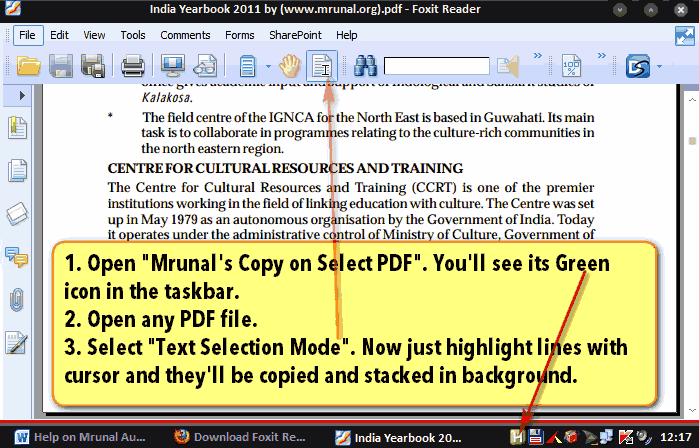
- Now read the Pdf file as per your convenience, and whenever you feel that some keyword or phrase is important, then just highlight it using your mouse cursor. (But make sure that you’ve selected “Text Selection Tool”)
- You’ll see that my script is copying those highlighted lines and you’ll receive ballon-tray notifications.

- Continue the activity until you’ve finish the topic/chapter in the given pdf file.
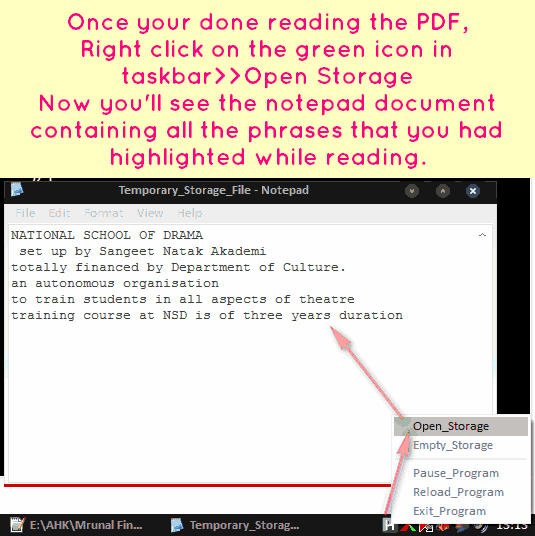
- Once you’re done reading the topic/pdf file, then right click on the green icon in taskbar -> “Pause Program”
- Now again Right Click on green icon > “Open Storage” and you’ll see the notepad file containing all the phrases that you had highlighted during reading.
-
Click to Enlarge
- Copy paste the content of this notepad file into another MS Word document / Notepad / Evernote / Onenote or any other software, as per your requirement.
- Close this notepad file.
- Right click on the green icon >> Empty Storage. (plz note, it’ll remove the content from that notepad file).
- If you want to continue making notes, then continue highlighting lines in Foxit. And repeat above steps for number 4 onwards.
- If you’re done, then exit the program by right click>>Exit program
Situation B: Auto Notes making from Website
- Launch google chrome.
- Double click on “Mrunal’s Auto Notemaker for Web”. Now You will see the green icon in the taskbar, near the clock.
- Just select the phrases/highlight phrases while reading any article or website and they’ll automatically get copied in background.
- Once finished, Right click on green icon > “Pause Program”
- Now again Right Click on green icon > “Open Storage” and your data will be there. Copy paste it in separate word file, evernote, freemind or any other software as per your requirements.
- Other instructions are more or less the same like Situation “A” for PDF files.
- You may also use this script for copying from MS Word, Notepad etc fileformats.
Converting Notes into Mindmaps
Suppose after copying from here and there, you’ve gathered following lines
- Train Collision Avoidance System (TCAS)
- combination of GPS and Radio Frequency enabled technology
- applies brakes without the intervention of the loco (train) pilots
- avoid collisions due to human errors,heavy rain or fog, natural calamities or sabotage.
- NATIONAL SCHOOL OF DRAMA
- set up by Sangeet Natak Akademi
- totally financed by Department of Culture.
- an autonomous organisation
- to train students in all aspects of theatre
- training course at NSD is of three years duration
The first four lines are from The Hindu newspaper (web) and remaining lines are from India Yearbook 2011 (PDF). I’ve made this list using my scripts. (I did not manually type above list)
- Now I want to properly arrange this data into a mindmap for quick revisions.
- So, Copy that list. (please copy such lists from a notepad text file or MS word file, because if you directly copy paste it from a webpage, then the list may not display properly in the mindmapping program.)
- Anyways, after copying the list, Open either Freemind or Mindjet Mindmanager.
- Create a new Mindmap.
- Now select Central Note (the gray circle titled “New Mind Map”) and press Ctrl+V (Paste)
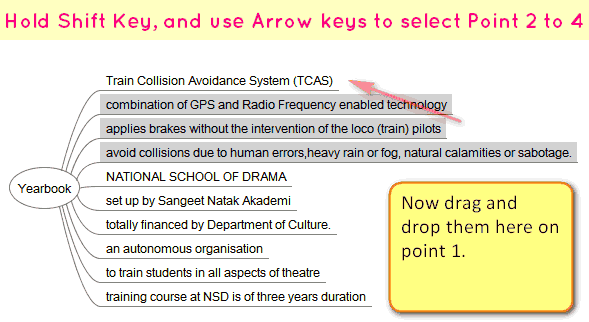
- You’ll get this result.
Click to Enlarge
Now hold down Shift key, and using arrow key, select the point number 2 to 4 and drag them into point number 1. And you’ll get this result:
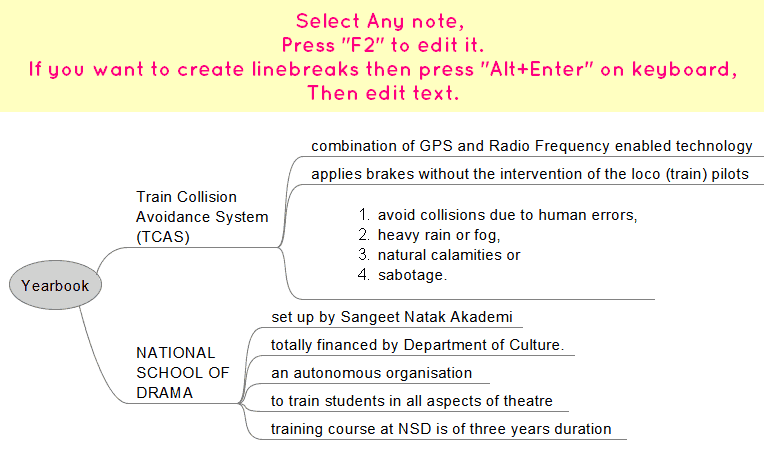
Click to Enlarge
Lastly, I’ve added some fancy formatting to beautify the mindmap and here is the final result.

Click to Enlarge
Troubleshooting the Scripts
- I’ve tested this on XP SP3, working without problem.
- Tested on Win8 (64-bit). As long as you launch the program via right click “run as administrator”, should work fine.
- This does not work with just ‘any’ version of Autohotkey software. This works only with a customized version of Autohotkey software, known as “Lexicos’ build. (Autohotkey_L)” So if you’re having any issues, uninstall your autohotkey, then download and install following file: http://l.autohotkey.net/AutoHotkey_L_Install.exe
- If you got the error window that “—> 023: Run,%A_scriptdir%\Temporary_Storage_File.txt...huge piece of code” This happens when you launch the script for the very first time and directly click on green icon >> open storage. This error happens because system has not yet created that “Temporary_Storage_File”. So solution is simple: relaunch the script, Selected a few lines in PDF/Webpage only for testing and then Green icon > right click > Open Storage.
- Sometimes it doesn’t detect the lines selected by cursor. So either restart the program or try again. If you drag your cursor too fast or too slow, then the script may not detect and copy the text. In the Web script be extremely cautious while moving your mouse in dragging and highlighting lines, else it might copy the whole web instead of a single phrase :)
- Will not work if the PDF file is “copy-protected” or if it is just a scanned image of a document without OCR. Same goes for Non-English PDF files
- Mrunal’s Auto Notemaker for Web, tested on firefox, internet explorer and Chrome. (Although Chrome would most reliable). If problem then disable other Plugin/addons.
- Better “Empty Storage” after work is done. i.e. right click on green icon >>Empty Storage.
- Better close/exit the script when not in use. Otherwise script might unnecessarily keep copying the text while you’re surfing websites for non-study purpose.
- May or may not function properly if you’re using Vista or Win7 or Windowsblinds themes (because of the “ Balloon Traytip” feature)
- Donot launch both scripts simultaneously. Use only one script at a time.
- Donot use this in combination with Clipmate or Clipcache or similar clipboard modifier programs.
How to Report Bugs/Errors
If you run into any trouble, don’t hesitate the post the comment below.
But For faster diagnosis of problem, please describe it in following format.
- Name of your Operating System: Win XP, Vista, Win7, Win8
- Are you using Autohotkey “Lexicos Build”?: Yes/No.
- Script : PDF or Web?
- Name of the web browser (if problem in Web script): Internet Explorer, Google Chrome, Firefox
- Description of the problem and what solutions have you tried:
Eye Strain
- My script copies the data in a .txt file (notepad file)
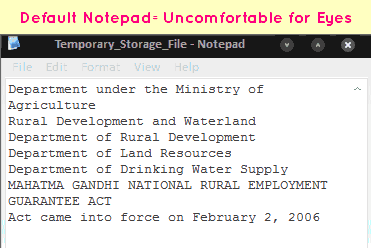
- But the default notepad has white background and black text = very uncomfortable for eye, if you consciously work for more than 10 minutes.
- Therefore I suggest you use Notepad++ (free download: CLICK ME)
- Open notepad++, click on Settings >> Styler Configuration >>Change theme according to your liking.
- To make Notepad++ as your default alternative to Notepad, you need to goto Notepad++ >> Settings Menu >>Preferences >>File Associations >>.txt
- Compare the screens:

Foxit PDF reader: Changing Background Color
- When you’ve to read lengthy PDF files, with white background + black text = very uncomfortable.
- To solve this problem, Goto Edit>Prerences (or press Ctrl+K on your keyboard)
- Now select “Accessibility” and replace the document colors (for example black background and yellow text).
![[Tech] Using Microsoft Onenote to organize your study-notes: Image to text, Audio notes and more](https://mrunal.org/wp-content/uploads/2012/12/i-onenote-500x383.png)
Thanks a lot sir, it is of great use…your support to aspirants is commendable!!
Operating System Win7
using Autohotkey “Lexicos Build”?: Yes
Script : Web
Name of the web browser : Google Chrome
Description of the problem and solutions have i tried:
no error but the script is not detecting text .disabled extensions , plug -ins . restarted the program , chrome even laptop.
working just fine for pdf …n loads of thanks sir for everything you are doing for us .
sir,good afternoon.
when u will put up the upsc mains gs 1-4,essay,english language,regional language, etc .model answer paper written by topper of the upsc exam.
SIR CAN I HAVE THIS SOFTWARE FOR MAC???
We can make notes using clipmagic or ditto….
Rather i do not understand why to use so many softwares..
Clipmagic works fine with pdf reader as well as for web page…and its too easy to understand….
Hello, is this software available for Mac
hello dear,
in auto notemaker pdf…when i copied any text it will automatically copied two times in the storage side(ms word)….so pls short out ds prblm…u r dng grt job..thnksss
sir,
I am having problem with the web script ,it copied multiple times.
hey mrunal….i m working on win 7 and also run script as admin…but again text copied twice…pls resolve this problem as soon buddy
Mrunal u are of great help boss!!!
tanks a ton!!
how to do it from word
Hello Mrunal,
First of all, Thanks for your good work. The tool you provided is of immense help to take notes.
One request about pdf note taker tool. Is it possible to change the script such a way that it takes notes while we highlight the text in Foxit reader instead of regular selection?
sir iam in my graduation 3rd year.. ill be writing my examinations in 2014 april.. somehow i have managed to lose my two precious years in graduation bcoz i was suppopsed to complete my graduation in 2012 itself..
i hv lost control on myself but i hvnt lost that passion of being an ias.
i eagerly need your’s invaluable attention
plz recommend me how to study if i hv to qualify upsc in my appearing attempt keeping in mind that iam not economically well supported to go to delhi for coaching.. i want to do it by myslef..
plz respond as soon as possible for u
thanking you!
Sir
Do these scripts and window spy software will affect our privacy of email passwords and banking details, I am asking you bcz I am not aware with these softwares though these apps are very effective in making notes.
plz reply soon
Thanks
This is awesome. thanks a lot for creating this script :)
Name of Operating System: Win7
using Autohotkey “Lexicos Build”?: Yes
Script : PDF and web, both
Name of the web browser (if problem in Web script): Google Chrome,
Description of the problem and what solutions have you tried:unable to make notepad++ the default alternative to notepad. have done the steps you mentioned above: preference->file accessibility->.txt.
Sir,
Mrunal WebAutoNoteMaker has a real problem…….once I select a text and then I proceed to further reading,the selected text keeps upon getting copied multiple times automatically…plz resolve my problem
Any way to copy non text content? Since it’s note pad …
formatting problem…any way to keep original formatting or change default storage program to word?
All the info is very useful as usual. I would like to know if anyone knows how to copy the text from pdf files that are “secured”. I am unable to copy the text from frontline as all the downloads of Frontline are “Secured” pdf. I could copy text from Yojana & Kuru. But frontline is more smart :D
thish is nice softwere
sir please solve the problem of multiple copying and delay in copying with windows 7 while using web pages as early as possible
thank u
mrunal has not mentioned the license type on the script, i can probably fix it for you daya, if this script is open source, is it?
i think its not an open source
lets see what mrunal has to say about this, i could probably whip up my own script but i don’t have that kind of time. if you have an apple/mac computer i have got the script ready but for windows/AHK lets just have mrunal’s software.. please mrunal could u clarify here…
@daya: see mrunal’s solution given in response to sree kumar’s comment below, your troubles are over!
yeah i had tried but the problem of delay in copying persists and few times it is getting copied multiple times
@daya: i created my own app fixing some of the problems with the software mrunal gave, additional improvements are: 1) no longer people need to run Autohotkey, this is an exe, just download and run 2) no problems with different versions of windows, i have tested it on Xp, Vista and windows 8, works like a charm. 3) makes a little system “beep” sound to let the user know data has been copied (better than silly pop-ups IMHO)
DISTRIBUTING AS-IS, UNDER A GNU-GPL LICENSE BY DOWNLOADING YOU AGREE TO THE TERMS BELOW:
Copy BY G-FOX
Copyright (C) 2013, G-FOX
This program is free software: you can redistribute it and/or modify
it under the terms of the GNU General Public License as published by
the Free Software Foundation, either version 3 of the License, or
(at your option) any later version.
This program is distributed in the hope that it will be useful,
but WITHOUT ANY WARRANTY; without even the implied warranty of
MERCHANTABILITY or FITNESS FOR A PARTICULAR PURPOSE. See the
GNU General Public License for more details.
You should have received a copy of the GNU General Public License
along with this program. If not, see .
https://www.dropbox.com/s/clbbzcgpjxipzdq/Copy.exe
@daya: temporarily disabling the download link above because i got a warning from dropbox servers regarding the “unsecure” nature of the file, apparently the linker/loader triggers their antivirus scripts into action so they have deleted the file from their servers, i will recheck the code and fix it when i can, meantime any feedback would be good from anyone who downloaded it yesterday. does it trigger your antivirus too?
Hi Sir,
I downloaded the pdf file from munral and opened it in Foxit and you informed to select text selection tool but i am not able to find any option for tools. wat shall i do?
hi sir.
i downloaded the pdf file reader .im using windows7.it is working.but i am facing the problem of multiple copying and delay in copying. sir pls help me to solve this problem
and also the text selection tool in the tool bar is not visible. pls help .
sir your autonote makers is really handy tool,thanks !!
iam facing trouble in operating it ,the selected text (foxit pdf) is getting copied repeatedly (8-9) in notepad own its own..making it impossible for me to use it ..kindly suggest the solution …please
if you’re on win7 or win8
right click on script icon=>run as administrator.
thanks you sir!! its working ….so relieved
honestly,was not expecting so quick reply….glad u proved me wrong!!!
*******BOOM****BOOM*****BOOM*******
No more ERRORS Freinds just do the following steps and njoy making notes without any single irritation!
1. Dwnld this AWeSOME software Autoclipx, Link- http://12bytes.org/software/autoclipx
2.Install and run it then go to the configuration by right clicking on icon of autoclipx present in the task bar.
3.In Autosave tab click “Save all copied text to file.” and choose ur autosave location(if u hav external hd i will recommend that)
4.In Coping Tab click “Allow copy with the arrow cursor.”
Thats it!!!
NOW EVERYTHING WILL BE COPIED IN THE TEXTFILE YOU HAV TO JUST HIGHLIGHT THE TEXT ,NO MATTER WEATHER IT IS MOZILLA OR CHROME,ADOBE OR FOXIT ,WORD OR POWERPOINT
DONT thank me becus am like u try 2 help others,if possible donate to the devloper!!
Hi Rusty,
I have downloaded the above software and it is working fine with MS Word and Chrome, but its not copying the content from Adobe PDF. Please help fix the issue.
Thank you…
but whr did u get the registration key it is not free software
is there a code for epub files
hey mrunal this is not working in my window xp. a notepad opens but didn,t copy the data which i m selecting
Hi Mrunal Sir,
I am trying to use this Note maker on my win8/32 bit but I am not getting “run as administrator” option by right click…
please give me solution for it…